On-Site Radio builds a music log from your Apple Music library, mixes in sweepers, jingles, commercials and voice tracks, and plays it all with smooth, timed segues. Set it up once and let it run.
Radio fansHouse partiesShops and restaurantsEvents and tailgatesGyms and studiosOffices and lobbiesHosts and DJsRadio fansHouse partiesShops and restaurantsEvents and tailgatesGyms and studiosOffices and lobbiesHosts and DJs
How it works
Sounds like radio. Runs itself.
A playlist just plays songs. On-Site Radio runs your music the way a station does, with a format, station imaging and breaks, all timed for you.
STEP 1
Build your hour
Lay out a clock: a song, a sweeper, two songs, a jingle, a commercial break. Pick genres for each song slot and choose which clock plays each hour of the day.
STEP 2
Add your sound
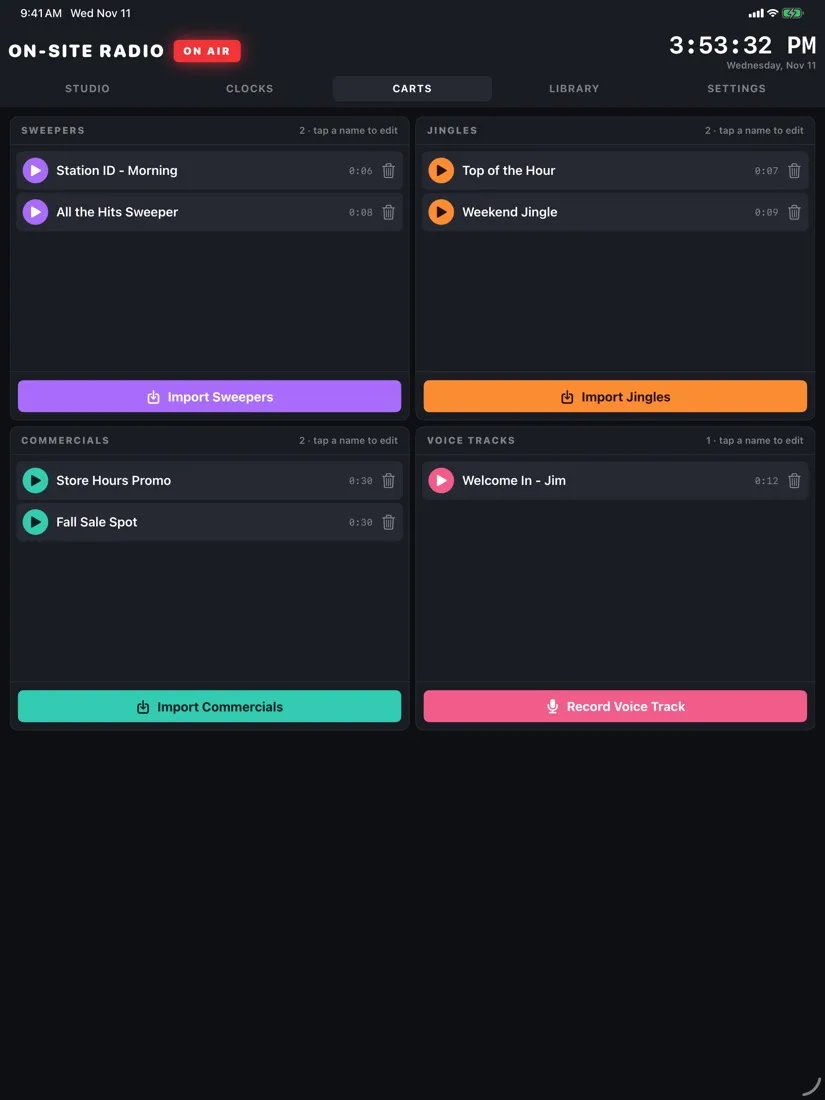
Import sweepers, jingles and commercials from Files, or record voice tracks right on the device. The app evens out the volume so nothing jumps out.
STEP 3
Press Start
The app builds the log from your library and plays it, starting each next item at the right moment. Skip, add a song or fire a jingle any time.
Features
A full studio in your hands.
The tools a radio station uses, sized for iPad and iPhone, in portrait or landscape.
01 · STUDIO
Everything on air, at a glance
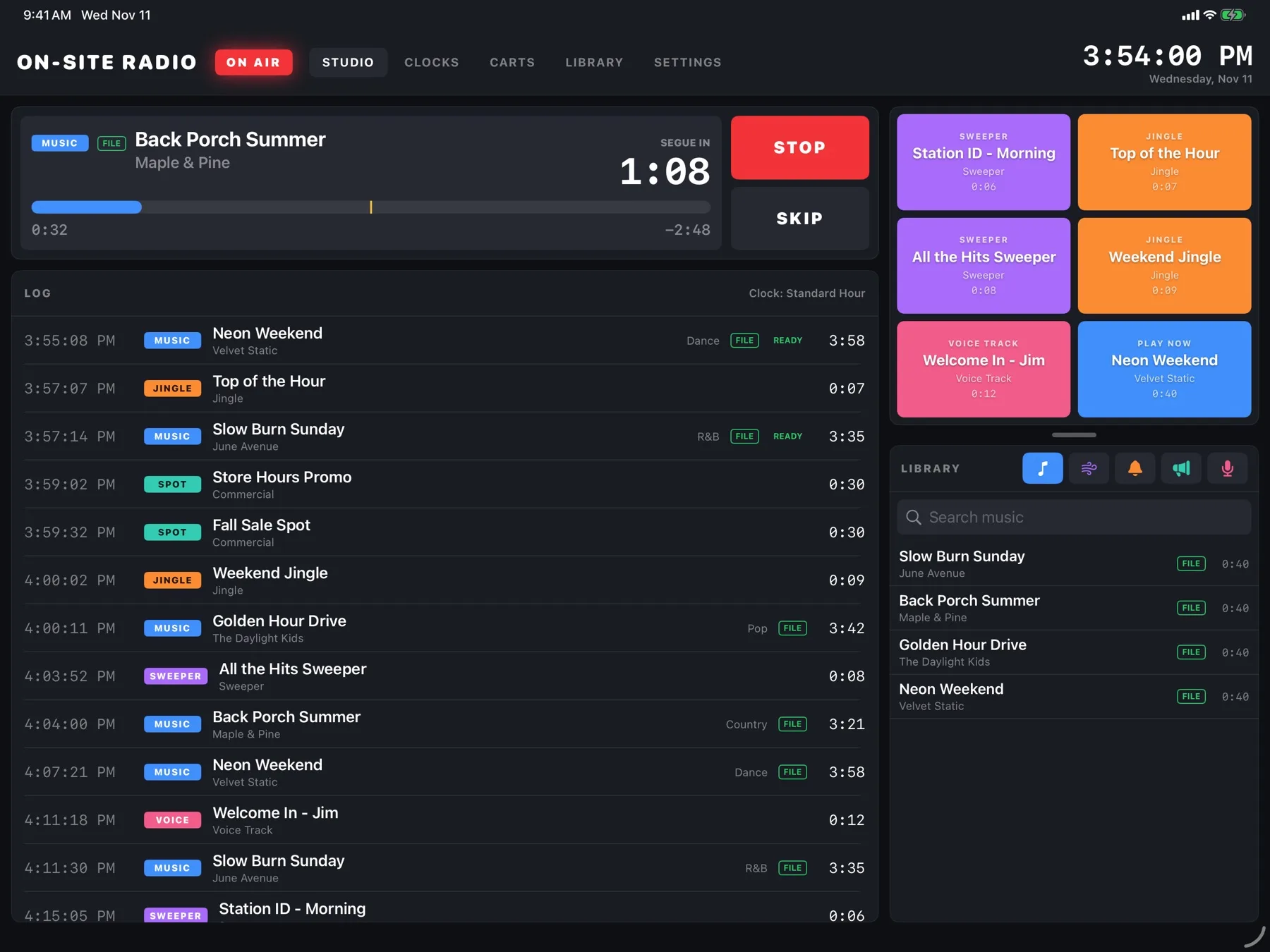
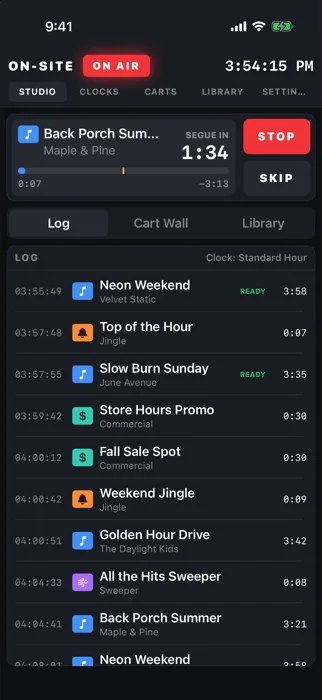
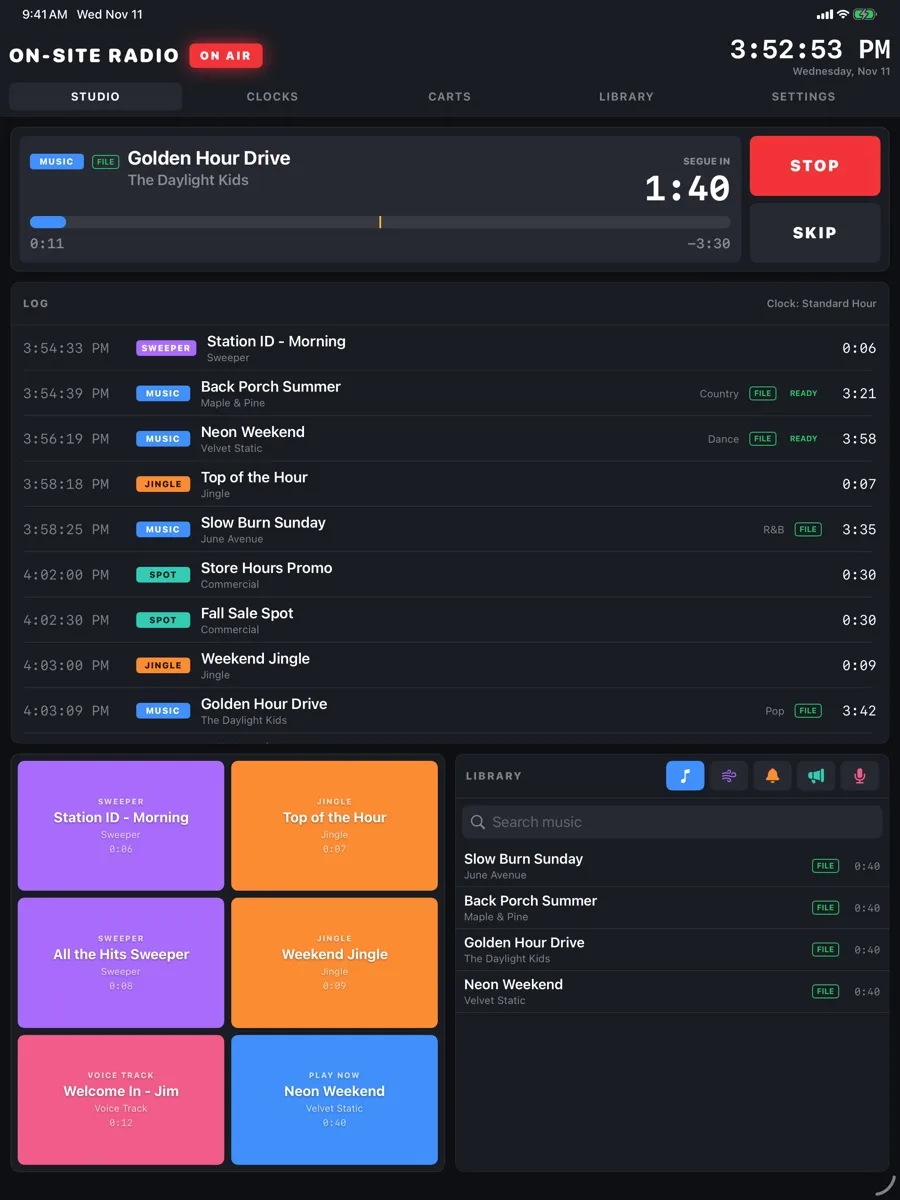
The Studio screen shows what's playing, how long until the next item starts, and the whole log ahead with start times. Big Stop and Skip buttons sit right where your thumb is.
Countdown to the next segue, with the time left in the song
Search your library and drop a song into the log by hand
MusicSweeperJingleSpotVoice
02 · CART WALL
Fire a jingle on cue
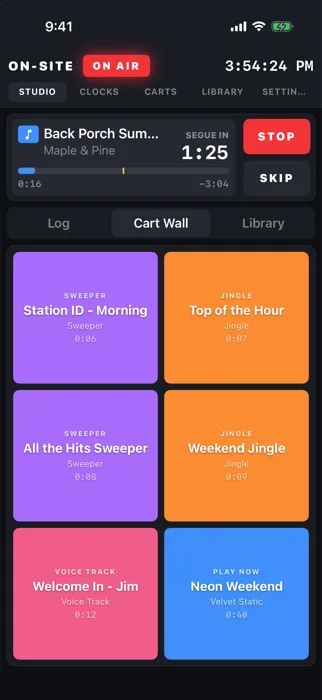
Six big buttons for the sounds you reach for most. Tap a sweeper or jingle and it plays right away over the music, just like a jock in a real studio. Put a song there and it cuts in when you tap it.
Load sweepers, jingles, voice tracks or a song into any box
Colors match the category, so you can find them fast
On iPhone, the cart wall is one tap away
03 · CLOCKS
A format, not a shuffle
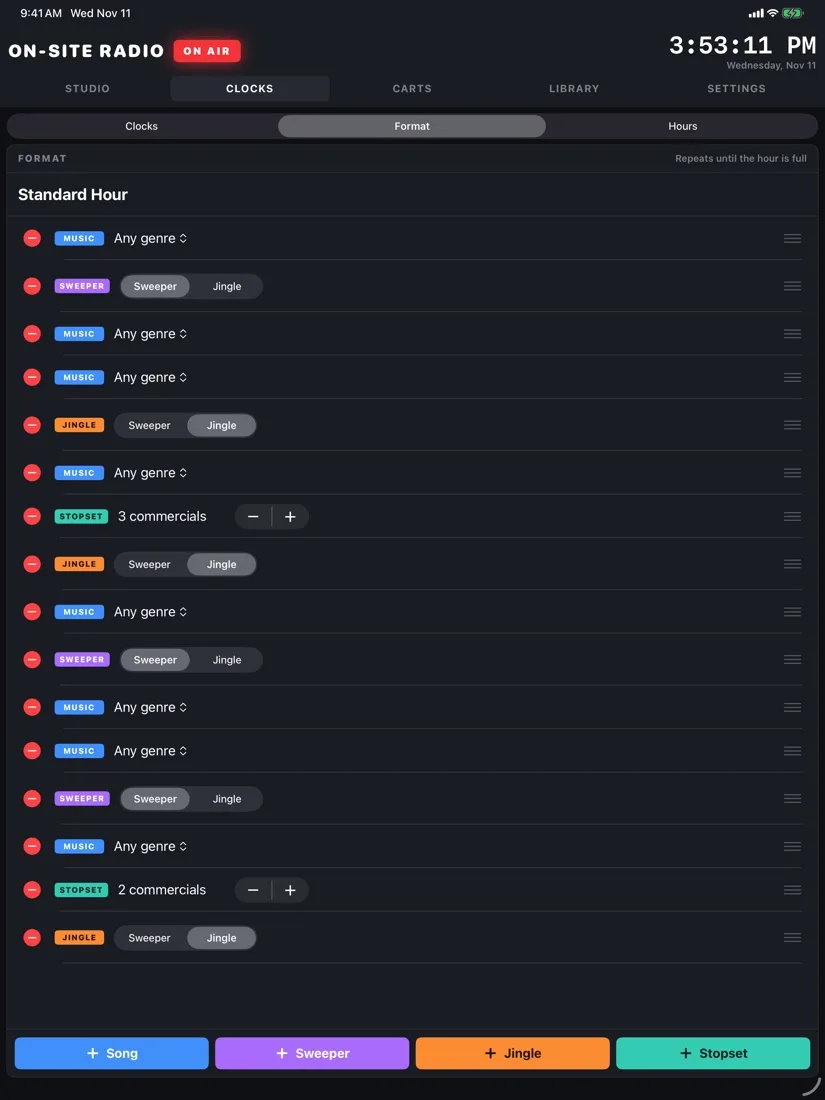
Clocks are the recipe for each hour. They repeat until the hour is full, and you choose which clock runs at each hour of the day, so mornings can sound different from evenings.
Song slots by genre, or any genre
Commercial breaks of as many spots as you like
Keeps the same artist and song from repeating too soon
04 · SEGUES
Smooth from one song to the next
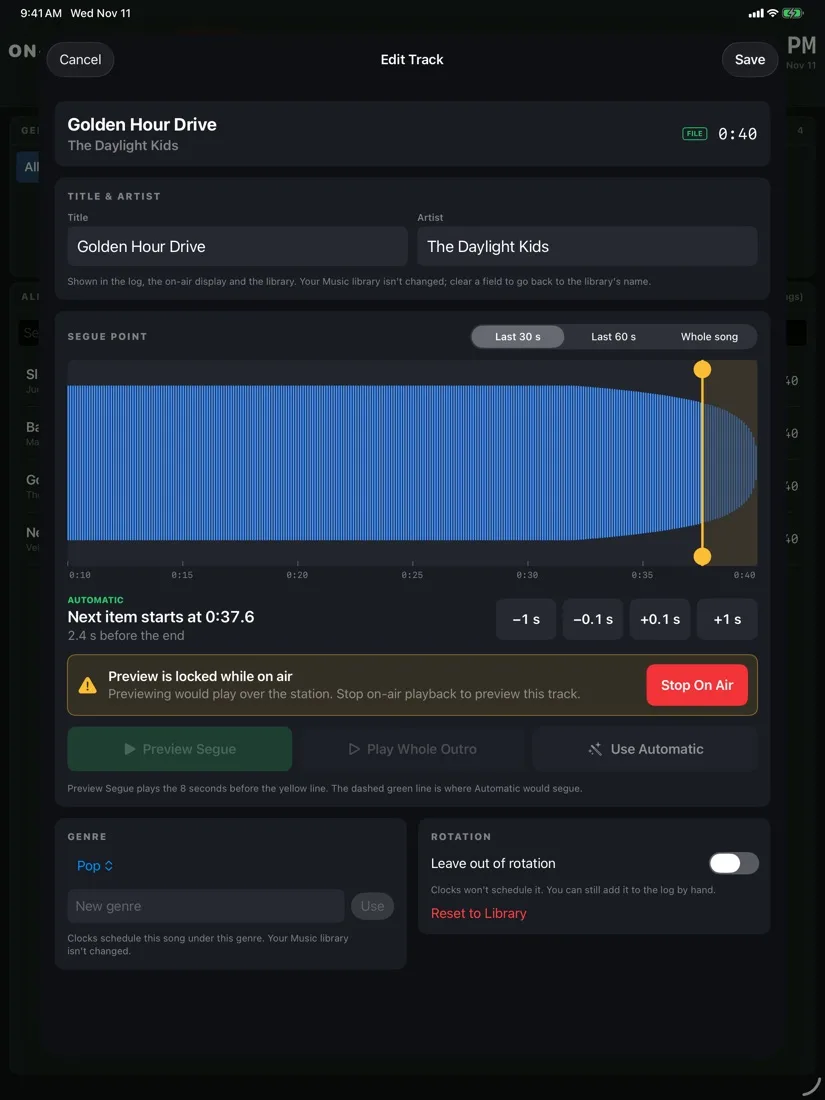
For song files you own, On-Site Radio listens for the fade at the end and starts the next item as the song trails off, so they overlap like they do on the radio. Apple Music songs play back-to-back, with sweepers starting a few seconds before the end.
Fine-tune any song's segue point on its waveform
Preview the segue before it goes on air
Fix a title or genre, or leave a song out of rotation, without changing your Music library
05 · VOICE TRACKS
Talk to your listeners
Record a quick hello, a welcome, a birthday shout-out or a store announcement with the device's microphone. It saves as a voice track you can drop into the log or onto the cart wall.
Record, listen back and save in a few taps
Volume is matched to your music automatically
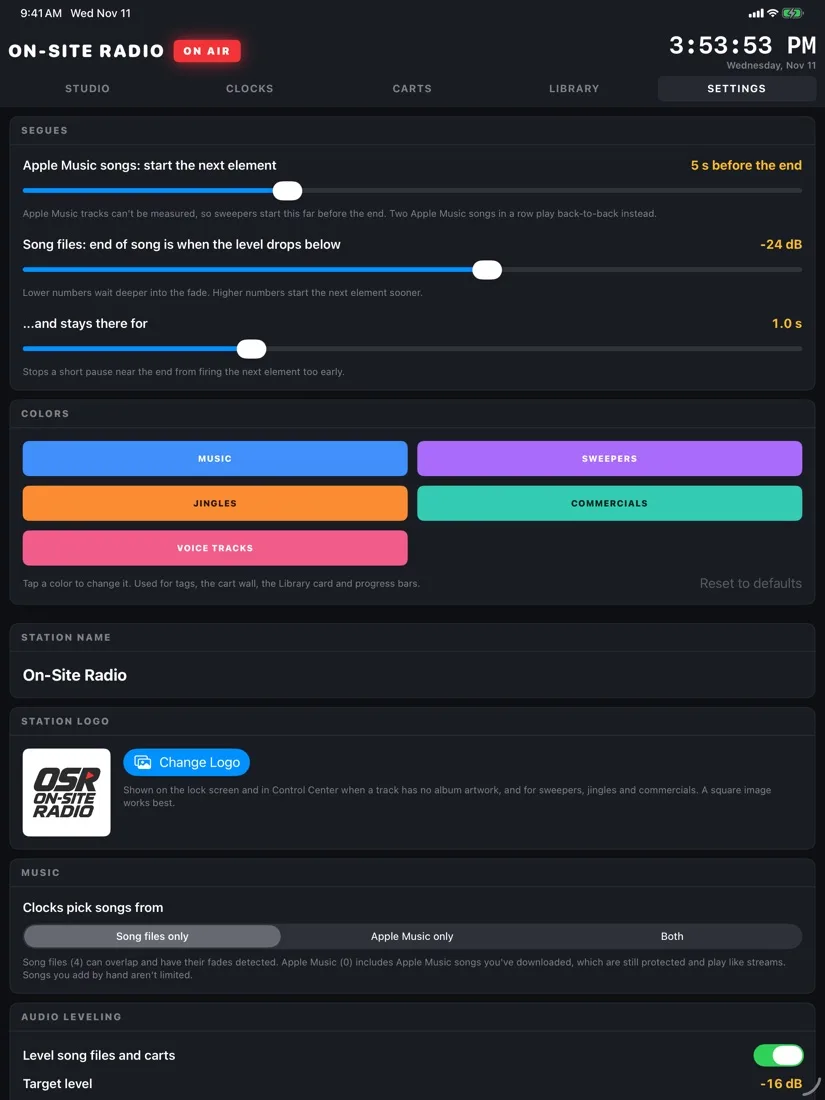
Make it your station: set its name, logo and colors
For business
Your Business Radio.
Have the kind of station you hear in major retailers: music picked for your customers, your own imaging, and your messages playing on schedule all day.
IN-STORE RADIO
Sounds like your brand, not a playlist
Name the station after your business and give it your logo and colors. Import produced spots and jingles from the Files app, or record an announcement at the counter. Clocks drop them between songs at the times you choose, every hour, without anyone pressing a button.
Commercial breaks for specials, sales, events and store hours
A different clock for each part of the day, from opening to close
The same song and artist won't repeat too soon
Plays through your sound system by cable, Bluetooth or AirPlay
MAIN STREET MARKET RADIOON AIR
Golden Hour DriveSong
“You’re listening to Main Street Market Radio”Sweeper
Paper LanternsSong
Weekend produce saleStore spot
Bakery is open until 6Voice track recorded in store
Station jingleJingle
Slow Lane SundaySong
Example log. Store and song names are made up.
Check music licensing first. Playing music for customers usually needs a public performance license, and personal streaming subscriptions such as Apple Music are generally for personal use only. On-Site Radio doesn’t include any music licenses, so check what’s required where you are before you go on air.
Who it's for
One app, a lot of stations.
Anywhere music plays, On-Site Radio can make it sound like a station that was built for that room.
The soundtrack to your party
Plan the music for the whole night, then put the phone down. Your clocks keep the energy where you want it, and the cart wall has the party jingle ready.
Try: a "Backyard FM" station with its own name and logo, plus voice tracks welcoming your guests.
Your messages, between the music
Shops, restaurants and salons can play their own announcements between songs: today's special, store hours, a sale, a holiday greeting. Commercial breaks play them on schedule, every hour.
Try: a two-spot break each half hour with this week's specials, recorded on the iPad at the counter.
For people who love radio
Ever wanted to program your own station? Build clocks, import imaging, voice track your shows and watch the log roll, the same way the pros do it.
Try: recreating the format of the station you grew up with, using your own music.
Events and tailgates
Fundraisers, car shows, tailgates and reunions get a real on-air sound, with sponsor thank-yous and reminders that play between songs.
Try: a voice track every few songs announcing the next activity.
Gyms and classes
Keep the tempo up with genre clocks for each hour, and put "two minutes left" or "switch stations" cues on the cart wall.
Try: a high-energy clock for morning classes and a calmer one for the afternoon.
Lobbies and waiting rooms
Background music that also tells visitors what they need to know: check-in steps, new services, office hours, or a friendly welcome.
Try: a relaxed format with a short message after every third song.
Playing music in a business or at a public event may require a public performance license. Check what applies where you are.
Always in view
On air, even when it's locked.
On-Site Radio shows up across iPhone and iPad, so you can see what's playing and control it without opening the app.
Golden Hour DriveThe Daylight Kids
Lock Screen and Control Center
A Now Playing player with album art, or your station logo for sweepers and jingles, plus Start, Stop and Skip.
Back Porch Summer
Dynamic Island
On iPhones with the Dynamic Island, the station stays in view at the top of the screen while you use other apps.
ON AIR
Neon Weekend
Velvet Static
Up next: Top of the Hour
Home and Lock Screen widgets
"On Air" widgets show what's playing and what's up next, right on your Home Screen or Lock Screen.
Your Apple Music library
Uses the songs already in your library: files you own and songs from Apple Music.
Even volume
Song files and carts are leveled so nothing is too loud or too quiet.
Picks up where it left off
The log is saved as it plays, so a restart doesn't lose your place.
Portrait or landscape
Built for iPad and iPhone, either way up.
FAQ
Good questions.
Is it for professional radio stations?
No. On-Site Radio is personal radio automation: it plays your station on your iPad or iPhone, or on the speakers it's connected to, for your home, your business or your hobby. It isn't meant to replace the automation systems that broadcast stations use.
What devices does it run on?
iPad, iPhone and iPhone Duo. On-Site Radio is an iOS app, and works in portrait and landscape.
Where does the music come from?
From the Music library on your device. Song files you own can overlap at segues. Songs from Apple Music need an Apple Music subscription and play back-to-back, because only Apple's player can play them.
Where do sweepers, jingles and commercials come from?
You bring your own. Import audio files from the Files app (including iCloud Drive), or record voice tracks with the device's microphone.
Do I need to be online?
Song files you own play without a connection. Apple Music songs stream, so they need one.
Does it collect my data?
No. There's no account to create, and your music, audio and settings stay on your device. The privacy policy has the details.
Where can I get it, and what does it cost?
On-Site Radio is available now on the App Store for $29.99 in the US. It’s a one-time purchase with no in-app purchases. Prices in other countries are set by the App Store. Apple Music songs need your own Apple Music subscription.
Get ready to go on air.
On-Site Radio is on the App Store now for iPad, iPhone and iPhone Duo. $29.99, one-time purchase.